
Ad
I think it’s fair to say that this year, many of us have taken to exploring our local area much more than we might have anticipated!
I know that the five of us have had lots and lots of walks, and it’s been noticeable how the kids have embraced this and not moaned anywhere near as much as they might have done last year. Even when we are taking the same route in the same parks.
As we enter the colder, winter months and restrictions start to ease in some areas, we are looking forward to travelling further afield to explore new areas. We were recently asked to take a look at a new app which is designed for families to help them to explore parks in new and innovative ways.
What is the Love Exploring App?
The Love Exploring App is an app available on iPhone and Android and is free to download. It requires a quick sign up but once you’re logged in it is super easy to use. It utilises your phone’s GPS to show you what parks are listed nearby with activities.
We do like exploring local parks and walks, but sometimes I am a little unsure if we are on the right track, or the children groan at going to a familiar park, preferring instead to head somewhere new. The Love Exploring App offers a range of trails and games to play in different parks. Bringing a new element of fun to your family walks.
The app isn’t just for families – it’s good for anyone who wants to learn a little more about the places they frequent or are looking to try a new route in a familiar park. It’s really easy to get stuck in a rut so this app is a great way to explore.
Using the App
I had a quick look through the app and was pleased to see there were a good number of local parks included in the app. I chose to visit Debdale Park as that was a localish one for us and it’s a park I’m not very familiar with and I wanted to check out how clear the trail guide was in a place I wasn’t especially knowledgable about.
Once I arrived at Debdale and parked up I loaded up the app and selected the Lakeside Walk Route. The GPS located me close to the start of the walk so we picked up the trail and set off. There were parts of this walk that, had I not had the app and trail guide, I probably wouldn’t have headed down as it was unclear that it led to somewhere. However the trail guide showed the route clearly and my GPS was located right on the route, so I was confident with the path I was taking.

There are checkpoints along the way that change to a tick as you pass through them (second picture above); I initially thought these would be information points but they are there to help you know you’re on the right track. Checkpoint one is the start of the route (although we did later do the 1K route in reverse so it doesn’t really matter at which point you pick up a trail).
The park we visited also had a Dinosaur Safari Game. Parts of the Safari coincided with the Lakeside Walk so we switched to the Dinosaur Safari section for this to ‘catch’ the dinosaurs. This is a really neat game as it uses augmented reality to show you a dinosaur within the environment. As you walk with the game open, you get a countdown to show you how close you are to the dinosaur. Once within range, you can ‘snap’ the dinosaur. You do this by angling the camera to the ground and taking a picture. The dinosaur then appears on the screen and you can move around to see it from a different angle, or even get in on the picture too.
The children LOVED this part of the app and thought the dinosaurs swinging their heads and swishing their tails was a lot of fun! You are then asked a question and given some multiple choice answers before proceeding on.
We switched between the two guided walks and the dinosaur safari game during our time in the park.

What We Enjoyed
I was pleasantly surprised by this app, and when we visited another park a few days later the children asked me if they could see if it was on the app.
I plan to head to some bigger parks that have some different games (there’s a large localish park that has two dinosaur safaris and a Halloween Dance trail)
Some parks have audio trails, there is a tree trail that I am keen to try out as well as an ‘off the beaten path’ trail.
I like that each trail gives you an idea of the distance and time involved which makes it easy to plan with the children.
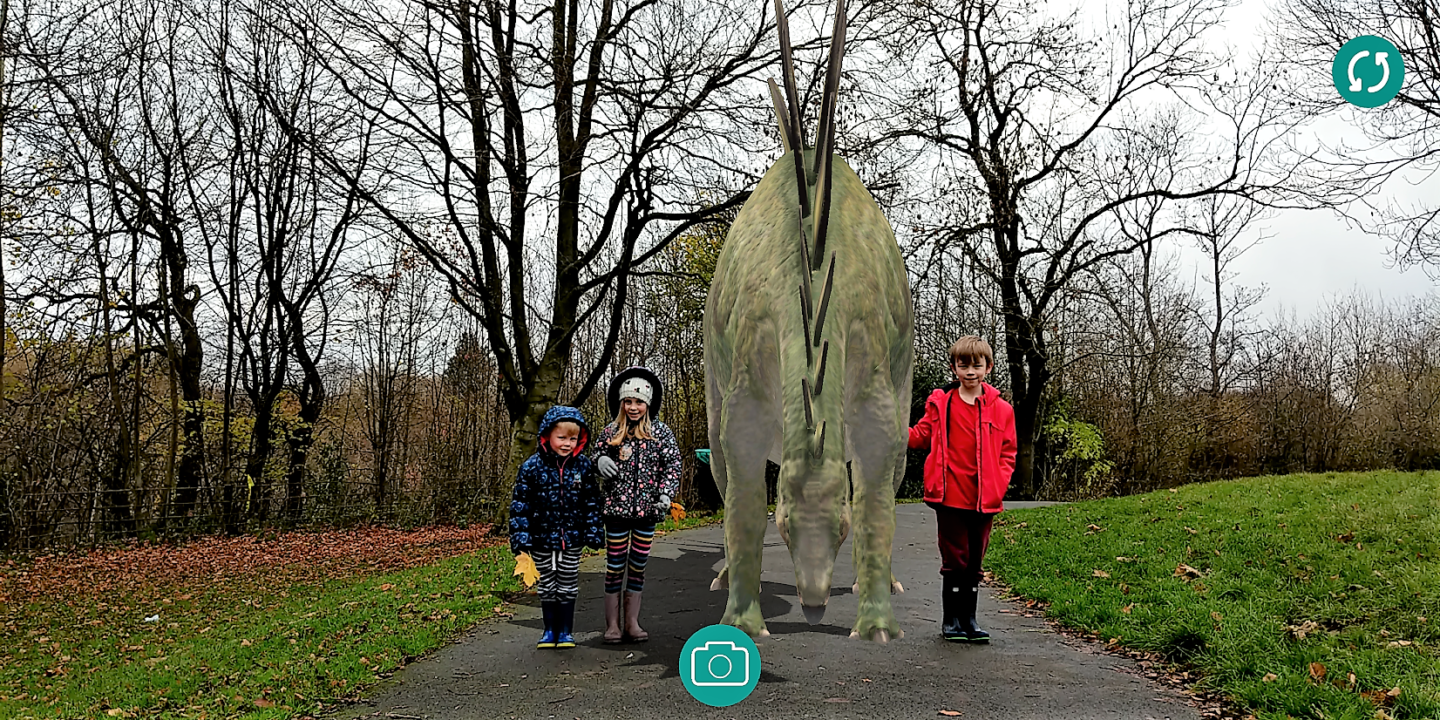
The AR was really impressive and worked very well. I took me a minute to work out what we needed to do but it was very intuitive (I’m using an android phone) and the app worked well.
The app has been very stable, picking up my phone’s GPS easily and locating me accurately within the maps on the app and correctly ticked me off passing each of the stages on the trail.
My only slight niggle with it was that when we left the trail to do the dinosaur safari it didn’t check off a checkpoint we had passed, so we had to exit the dinosaur safari and reopen the trail and rewalk through the checkpoint. It also then only calculated the completion time from the point at which the trail part of the app was reopened, rather than from the point we crossed the first checkpoint to start the walk. It’s only a slight niggle and I understand that reason is to do with preserving battery life and user privacy (which I totally get). For me, it’s not a huge issue and I wasn’t interested in timing myself (I have my Garmin watch for logging mileage and time) and it certainly doesn’t detract from the functioning of the app.
The children really enjoyed using this app as part of the walk and it will certainly be a little tool in my pocket for when I need to get everyone out for some fresh air when they’re less than willing! It’s really easy to use and I look forward to using this when we explore again soon.
You can see more of our walk in Debdale Park on my Instagram story highlights here.
At the time of writing, the Love Exploring App is free to download and available on the iPhone (6 and higher) and Android. I used a Google Pixel 2XL and the app was easy to download, install and use. I used a Google Pixel 2XL and the app was easy to download, install and use.





I’ve downloaded this app after reading your post. It’s fab.
Sounds excellent – Im going to download the app